Phone Cleaner
- 3.7
- Rating
- 100.00K
- Installs
- Free
- Price

 Analysis by App-foxy
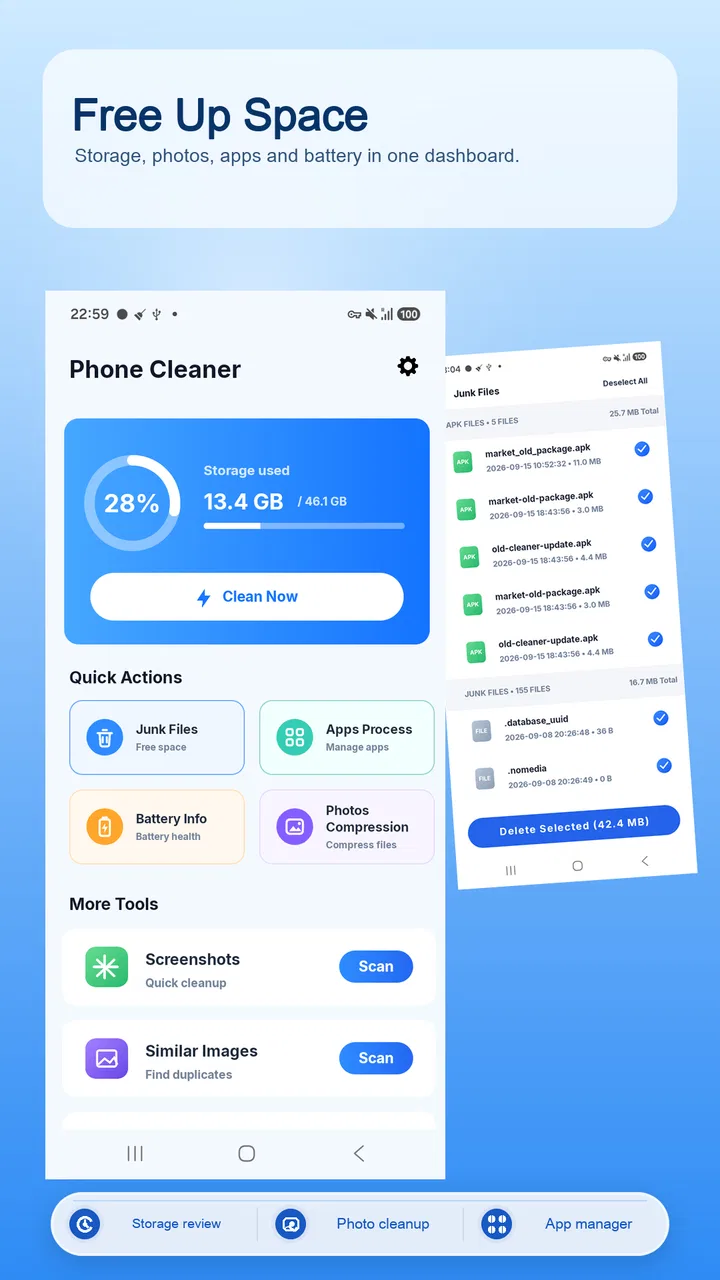
Phone Cleaner is the kind of Tools app I would reach for when my phone feels crowded but I do not want to spend an afternoon digging through settings. Developed by Omareyah Team, it brings several maintenance jobs into one place: clearing unwanted files, compressing photos, managing installed apps, and checking battery information. I found that combination more useful than a single-purpose cleaner because it encourages a broader look at what is actually taking up space.
My overall impression is practical rather than magical. It can make routine housekeeping easier, especially for someone who finds Android storage screens confusing or wants a simpler starting point. At the same time, a cleaner should not be treated as a button that automatically improves every phone. Removing files requires attention, photo compression involves a quality trade-off, and app management is only helpful when the choices are clearly presented. Those details matter even more for people with different visual, motor, or concentration needs.
How the app feels to read and navigate
The app presents itself as a straightforward utility, and that is the right approach for this category. The main tasks are easy to understand: junk cleanup, photo compression, app management, and battery information. I appreciate that these functions match everyday problems instead of burying the useful actions behind a collection of unrelated tools.
You May Also Like

 Blood Strike: 2.5 Anniversary
Blood Strike’s Loadouts Turn Every Drop Into a Tactical Gamble
A close look at Blood Strike’s custom loadouts: how fast access to signature weapons reshapes its battle royale rhythm, rewards preparation, and narrows the gap between fights.

 Pandora - Music & Podcasts
Pandora’s Music Is Easy to Start, but Harder to Recover
Pandora’s strength is its low-effort path from a seed to a station. Its weak spot is how much confidence it asks you to place in connection, setup, and quiet recovery.

 8 Ball Pool
 Is Built on Rivalries, Rematches, and Routine
A close look at the rivalries, rematches, shared routines, and unanswered safety questions that turn a quick pool match into a persistent mobile community.

 Samsung Music
’s Quiet Strength Is Playing What You Already Own
Its reach comes less from spectacle than from dependable access to a personal library. That simplicity is both the app’s strongest retention engine and its ceiling.

 AccuWeather: Weather Radar
AccuWeather Review: A Quick, Clear Forecast for Everyday Decisions
For everyday plans, the best forecast is the one you can understand quickly. AccuWeather makes rain timing, radar, and local conditions easy to act on, with a few trade-offs.

 Hill Climb Racing
Why Hill Climb Racing Still Turns Crashes Into One More Run
A tiny car, a bumpy hill and one more upgrade: Hill Climb Racing keeps resurfacing because its simple chaos makes every near-miss feel personal.
More From Our News Desk



For a first-time user, the clearest workflow is to choose one task at a time. I would begin with storage cleanup, review what the app identifies, and only then move to photos or installed apps. That sequence reduces the chance of making several changes at once and then wondering which action affected the phone. It also makes the experience easier to follow for anyone who benefits from a slower, predictable routine.
Readable organization is more important than a crowded feature list in a maintenance app. When I am trying to free space, I want the result of a scan to lead naturally to a review step, not force me to interpret technical labels. Phone Cleaner is best approached as a guided checklist: inspect, decide, and confirm. Users who prefer detailed file paths and complete control may find a dedicated file manager more informative, but many people will prefer this simpler starting point.
The app is free, carries an Everyone content rating, and runs on Android 8.0 or later. That makes it relevant to people using older phones as well as newer devices, although the experience can still vary depending on the phone manufacturer and its own storage tools. The current version is 1.0.2, so I would keep expectations realistic: this is a focused utility, not a replacement for every system management screen.
Making cleanup easier to understand
One useful habit is to treat the cleanup result as a recommendation rather than an instruction. Temporary material and genuinely unwanted leftovers are not the same as downloads, saved documents, or media that I may want later. Before confirming a cleanup, I would pause and look for anything recognizable. This small step is especially helpful for users who find dense file lists tiring or who need extra time to distinguish similar names.
Photo compression deserves the same care. It can be a sensible way to reduce storage pressure when a gallery contains many large images, but smaller files may not look identical to the originals. I would use compression on copies or on photos intended for casual sharing, while keeping important originals untouched whenever image quality matters. That workflow is more dependable than compressing an entire gallery in one pass.
The battery information area can also be useful as a quick reference point. I would use it to check the phone’s current battery picture before blaming storage or background apps for every performance issue. It is not a substitute for careful diagnosis, but placing battery information alongside cleanup tools helps me remember that a sluggish phone can have several causes.
Access across different abilities and situations
When I think about access across different abilities and situations, I focus on whether a person can make decisions at a comfortable pace, not just whether the controls are easy to reach. I would plan cleanup for a calm moment and keep a backup of anything important before changing files or photos. That practical approach also helps clarify which users are most likely to benefit from Phone Cleaner’s combined set of tools.
Visual comfort and sensory load
Phone maintenance is often done when a person is already frustrated: a warning says storage is low, an update will not install, or the camera refuses to save another image. In that moment, a calm sequence of clearly named actions is more valuable than a technically impressive dashboard. I found Phone Cleaner most approachable when used for one small job instead of trying to interpret every category at once.
People with reduced vision may prefer increasing the system text size or display scaling before using the app, if their phone supports it. That can make labels and results easier to inspect, but it may also cause some interfaces to show less content at once. A slower review is worthwhile because cleanup decisions should never depend on quickly scanning tiny text.
For users who are sensitive to visual clutter, the best strategy is to avoid treating every suggested action as urgent. Start with the area that solves the immediate problem, such as old unwanted files or oversized photos. Leaving app management and battery checking for later can make the session feel less demanding. This is one of the app’s strengths: its tools can be used separately rather than requiring a complete maintenance routine every time.
Users who rely on screen readers or other phone-level assistance should test the navigation with their own setup before committing to a large cleanup. The important question is whether headings, buttons, scan results, and confirmation choices are announced in a meaningful order on that particular device. I would not assume that a simple visual layout automatically provides the same clarity through assistive technology.
Motor control and decision-making pace
Cleanup tasks involve selecting actions and confirming changes, so accidental taps are a real concern for anyone with limited dexterity, tremors, or difficulty maintaining precise touch control. I recommend working while seated, using the phone with both hands if that is comfortable, and confirming each result deliberately. The safest workflow is not the fastest one.
Photo compression can create an additional decision burden because the user must balance storage savings against image quality. Someone who has difficulty comparing images on a small screen may want to compress only a clearly identified group rather than making a broad change. If a family member or support person helps with phone maintenance, this is an easy task to review together: decide which photos are disposable, which need original quality, and which can be reduced for sharing.
App management is similarly better when handled in batches small enough to remember. I would first remove apps I recognize as obsolete, then use the phone normally for a while before making another round of changes. This creates a simple recovery strategy if I later discover that an app was still useful. It is a more inclusive approach for people who need extra time to recall what each app does.
When access depends on the situation
A realistic use case is a person preparing for a trip with a nearly full phone. They may need room for maps, tickets, photos, or messages, but they may also be working under time pressure. I would open Phone Cleaner before leaving, review unwanted files, compress only suitable photos, and check the installed-app list for things that are clearly no longer needed. Doing the tasks in that order addresses immediate space without turning the phone into a rushed experiment.
Another situation is helping a relative whose phone has become difficult to manage. Instead of taking over and pressing every cleanup option, I would ask the owner what problem they are trying to solve. If the issue is photo storage, start there. If the issue is uncertainty about battery behavior, begin with the battery information. This keeps the person involved and avoids making the app feel like an inaccessible control panel.
Phone Cleaner can also fit users who do not enjoy technical maintenance. The free price removes a financial barrier for someone who wants to try a basic cleanup workflow, and the Everyone rating makes it suitable as a general household utility. Still, “free” does not remove the need for judgment. I would never recommend handing the phone to a child or inexperienced user and telling them to approve every deletion without supervision.
Where the usual alternatives are better
Android’s built-in storage settings are often the safer choice when I need exact control over categories, file locations, or system recommendations. A dedicated file manager is better when I want to move folders, inspect individual documents, or preserve a carefully organized archive. A gallery app may also offer more context for deciding which photos are duplicates, favorites, or important originals.
Phone Cleaner’s advantage is convenience: it gathers common maintenance tasks in one accessible destination. Its weakness is that convenience can hide the detail some users need. If I am troubleshooting a particular application, managing sensitive documents, or investigating a complicated storage problem, I would switch to the phone’s own settings or a specialized tool rather than relying only on a general cleaner.
Remaining barriers and sensible safeguards
The biggest barrier is the need to understand what will happen before confirming an action. “Junk” can sound harmless, but users should still inspect the categories and avoid deleting anything they cannot identify. This matters for everyone, and especially for people who process information slowly, use translation tools, or depend on a helper to explain unfamiliar terms.
Another limitation is that a single utility cannot know the personal value of every file. A screenshot may be disposable to one person and essential evidence to another. An old app may look unused but still contain local information. I would therefore use Phone Cleaner for discovery and organization, not as permission to erase broadly without review.
The app’s usefulness also depends on the phone itself. Manufacturers may already include storage cleaners, battery panels, or photo optimization features. In that case, Phone Cleaner earns its place only if its combined workflow feels easier to understand. If the built-in tools are clearer, more integrated, or better suited to the user’s accessibility settings, staying with them is the better decision.
Privacy-minded users should apply the same caution they use with any tool that examines phone content. I would read each screen carefully, grant only the access needed for the task, and avoid rushing through prompts. The app’s purpose is helpful, but a user should remain in control of what is inspected, compressed, managed, or removed.
Who should use it
I would recommend Phone Cleaner to someone who wants one uncomplicated place to review storage, reduce photo sizes, manage apps, and look at battery information. It is particularly suitable for users who do not want to learn several Android menus, provided they are willing to review cleanup suggestions before accepting them.
I would be more cautious recommending it to power users who need forensic file control, advanced battery diagnosis, or detailed automation. Those users may feel constrained by a general-purpose interface and get better results from the system settings or specialized applications. I would also skip it for anyone who expects a cleaner to repair every performance issue automatically; storage maintenance is only one part of phone health.
My inclusive verdict
After using it as a practical maintenance companion, I see Phone Cleaner as a convenient entry point rather than an all-purpose solution. Its focused set of tools makes routine housekeeping less intimidating, and the ability to handle storage, photos, apps, and battery information in one app can reduce the number of places a user has to search.
Its strongest quality is the potential to support different routines: a quick review before travel, a careful photo-compression session, or a guided cleanup with a family member. Its main weakness is shared by nearly every cleaner: the user still has to understand the consequences of deleting or changing content. Clear thinking matters more than pressing the largest button.
With an average rating of 3.7 from over 375 ratings and more than 100K installs, it has attracted a meaningful group of Android users while still feeling like a relatively focused utility from Omareyah Team. I would try the free app on a secondary or well-backed-up device first, follow a small-step workflow, and judge it by whether its presentation is easier for me than the phone’s built-in tools. For many everyday users, that convenience will be enough; for users who need maximum detail or specialized accessibility behavior, the usual system alternatives may remain the better fit.
My recommendation is simple: use Phone Cleaner as a careful guide to phone maintenance, not as an automatic permission to erase. If you review each action, protect important originals, and choose the tool that best matches your abilities and situation, it can make an otherwise frustrating chore noticeably more manageable.
FAQs for Phone Cleaner
01What is Phone Cleaner and what does it do?
Phone Cleaner is a utility app designed to help organize and maintain storage on an Android or iOS device. After scanning the phone, it can typically identify temporary files, cached data, duplicate or large items, and unused content. Its main purpose is to show what is consuming space and help users remove selected files, rather than magically increasing the device’s physical storage capacity.
02Is Phone Cleaner safe to use on my device?
Phone Cleaner can be useful when its scan results are reviewed carefully before anything is deleted. The app may request access to storage, photos, contacts, or other device data depending on the features available. Before confirming a cleanup, check each category and keep important files backed up. Avoid granting permissions that do not seem necessary for the advertised functions.
03Can Phone Cleaner really improve my phone’s performance?
The app may make a noticeable difference when your device is almost full, because removing unnecessary files can free storage and reduce some system slowdowns. However, it cannot repair damaged hardware, upgrade the processor, or guarantee longer battery life. Performance improvements depend on the phone’s condition, the amount of removable data found, and which files you choose to delete.
04What types of files can Phone Cleaner remove?
The exact cleanup options depend on the version and operating system, but Phone Cleaner commonly searches for cache files, temporary data, empty folders, duplicate photos, screenshots, large videos, and files that the user marks as unnecessary. Some categories may be restricted by Android or iOS security rules. Always inspect the proposed items, since a duplicate or old file may still be important.
05Is Phone Cleaner free, and does it require a subscription?
Phone Cleaner may offer a free download with basic scanning or limited cleanup tools, while advanced functions can be protected by advertising, in-app purchases, or a recurring subscription. The available pricing and features may vary by platform, region, and app version. Before starting a trial, read the payment screen carefully and check how cancellation and automatic renewal work through your app store.
Pros
- Quickly identifies large
- duplicate
- and unnecessary files.
- Simple interface makes storage cleanup easy for beginners.
- Can help free space without requiring root access.
- Useful tools for finding forgotten downloads and old media.
- Provides a convenient overview of storage usage.
Cons
- Some features may be limited or locked behind a subscription.
- Cleaning recommendations can require manual review before deletion.
- Background scanning may increase battery and data usage.
- Duplicate detection may occasionally flag similar files incorrectly.
- Results can vary depending on device permissions and Android version.

Phone Cleaner
Gallery